
How to Build a High-Performance JavaScript Event Calendar for Thousands of Events
Building a JavaScript event calendar is relatively easy when the dataset contains 20 events. At thousands of events, architecture matters more than CSS.
Render a month grid, loop through the events, place them into the correct days, and you’re done.
Then the dataset grows.
100 events still looks fine.
1,000 events starts exposing inefficient filtering and unnecessary DOM work.
At 5,000 or 10,000 events, the architecture matters far more than the CSS.
While building RollDate Events, I wanted to answer a specific question:
How can a JavaScript event calendar support continuous navigation and thousands of events without continuously growing the DOM?
The answer wasn’t a single optimization.
It required treating navigation, event storage, rendering, layout, and responsive behavior as separate problems.
This article covers the main lessons from that work.
Why Event Calendars Become Slow
A calendar looks simple because the final UI is familiar: days, time slots, and event blocks.
Internally, several expensive operations can happen at once.
When the user navigates to another month, week, or day, the calendar may need to:
- determine the new visible date range;
- find all events intersecting that range;
- calculate multi-day event placement;
- calculate overlaps between timed events;
- create or remove DOM nodes;
- update headers and navigation state;
- perform layout measurements;
- respond to scrolling or gestures;
- repeat part of that work during continuous navigation.
A naive implementation might look like this:
function renderCalendar(events, range) {
  return range.days.map((day) => {
    const dayEvents = events.filter((event) => {
      return event.start < day.end && event.end > day.start;
    });

    return renderDay(day, dayEvents);
  });
}
There is nothing inherently wrong with this for a small calendar.
But if every visible day scans the complete event collection, the amount of repeated work grows quickly.
Add multiple mounted periods for continuous navigation and the same inefficiency becomes considerably more expensive.
The first important principle is:
Don’t make rendering responsible for discovering all of the data it needs.
Separate Event Storage from Rendering
A cleaner architecture keeps event management behind a dedicated data layer.
Conceptually:
const store = new EventStore();
store.setEvents(events);

const visibleEvents = store.prepareRangeSync({
  from: visibleStart,
  to: visibleEnd
});
The view should not need to care whether the application contains 50 events or 50,000.
It asks a much narrower question:
Which events intersect the date range I am responsible for displaying?
This separation also gives event mutations a clear place to live.
A calendar API may expose operations such as:
calendar.setEvents(events);
calendar.addEvent(event);
calendar.updateEvent(id, changes);
calendar.removeEvent(id);
The important architectural point is not the exact method names.
It is that changing event data should not automatically mean destroying and recreating the entire navigation state.
If the current view and position can remain intact, the calendar should synchronize the affected presentation rather than behave as if the application has just started again.
That distinction becomes particularly important once navigation itself is virtualized.
Don’t Render an Infinite Calendar
Continuous calendar navigation creates an interesting contradiction.
The user should feel as if the calendar has no end.
The DOM absolutely should have an end.
A naive infinite calendar can simply keep appending periods:
January
February
March
April
May
June
...
That feels infinite for a while.
Unfortunately, the browser is keeping the receipts.
Scroll long enough and the page accumulates calendar segments, day cells, event elements, listeners, and additional layout work.
That is not really virtualization. It is postponing the problem.
A better model is a moving window.
Conceptually:
[ previous ]
[ current  ]
[ next     ]
When the user moves forward, the oldest segment can be recycled or removed and a new segment mounted:
remove oldest

[ current ]
[ next    ]
[ new     ]
The dates represented by those segments continuously change, but the number of mounted calendar segments stays bounded.
The user gets continuous navigation.
The browser gets a finite DOM.
Both sides get what they need, which is unusually civilized for frontend development.
The exact segment size depends on the view. A Month view, Week view, Day view, and Agenda list do not have identical rendering geometry, so they should not be forced through one simplistic virtualization model.
This is the same principle behind scroll-first date pickers: continuous navigation should feel open-ended while the mounted DOM stays bounded.
Each Calendar View Has Different Performance Problems
“Virtualize the calendar” sounds pleasantly simple until Month, Week, Day, and Agenda enter the room.
Each view puts pressure on a different part of the architecture.
Month
Month view is naturally organized around dates and weeks.
For continuous navigation, only the current and nearby calendar segments need to exist in the DOM.
As the visible range changes, older segments can be removed or reused while new ones are mounted around the active range.
The event representation also has to adapt to available space.
On a wide container, a month cell may have enough room for event titles and times.
On a narrow container, trying to preserve the same event cards can turn a seven-column calendar into a collection of unreadable fragments.
That is not a virtualization problem by itself, but performance architecture and responsive rendering meet here: there is little value in efficiently rendering information that nobody can read.
Week
Week view is considerably more demanding.
It combines:
- multiple day columns;
- a vertical time axis;
- timed events;
- overlapping events;
- all-day events;
- horizontal space constraints;
- touch interaction;
- continuous navigation.
This means Week performance is not simply a question of how many events exist. The view also needs to calculate where events belong and how much horizontal space each overlapping event can use.
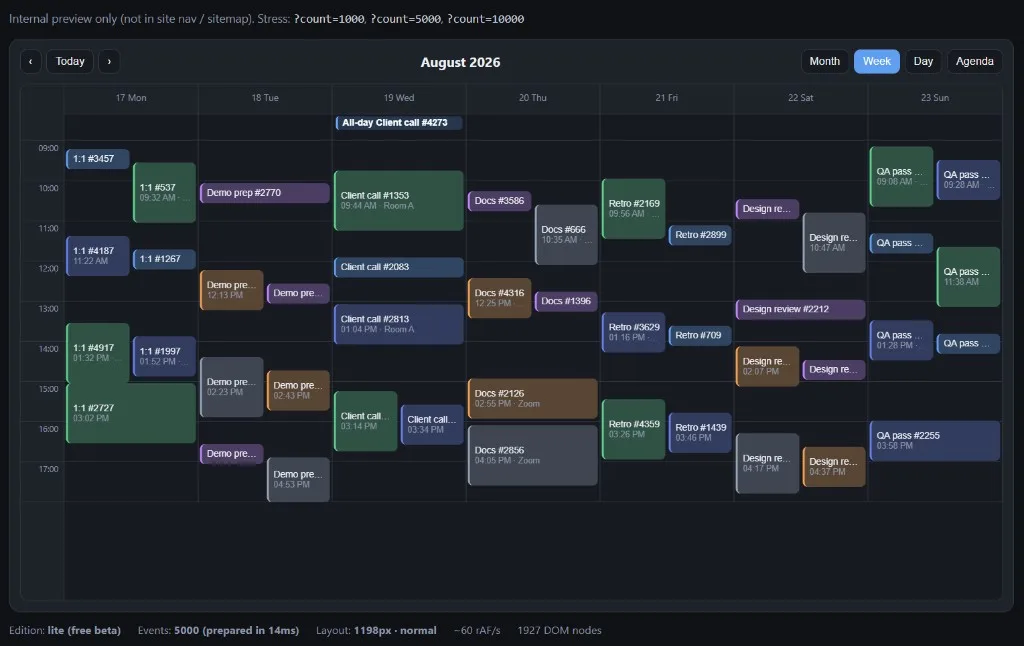
The screenshot above comes from an internal RollDate Events stress test using 5,000 generated events. The visible preparation time, DOM count, and approximate animation-frame activity are useful development signals for that particular run. They should not be interpreted as universal benchmark results across browsers, devices, datasets, or competing libraries.
The more important property to test is whether navigation remains bounded: moving through the calendar should not cause the DOM to grow indefinitely.
Day
Day view is simpler horizontally because there is only one primary date column.
It still needs to solve timed-event positioning and overlap.
Continuous navigation also means the implementation needs a clear lifecycle for the previous, current, and next date segments.
Without that lifecycle, even a visually simple Day view can accumulate DOM or leave observers and event handlers behind as the user navigates.
Agenda
Agenda looks simpler because it is a chronological list.
That simplicity is deceptive.
A calendar containing 10,000 events should not mount 10,000 event rows merely because the active view happens to be a list.
That is the kind of constraint the RollDate Events implementation applies in Agenda: virtualize surrounding date segments while allowing each currently mounted date to show its complete set of events.
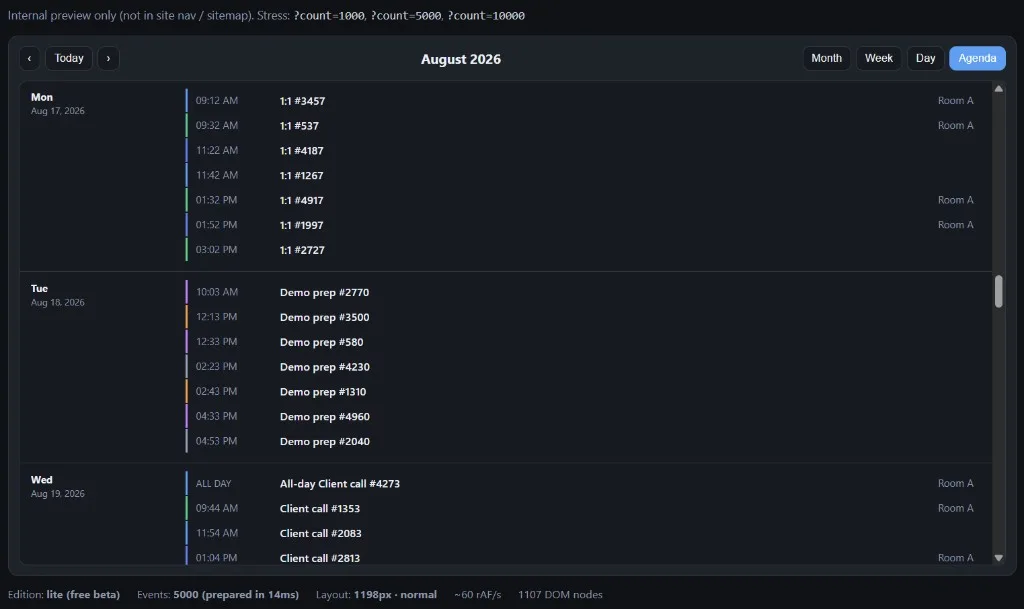
This distinction is important.
Agenda should not solve performance by arbitrarily hiding events behind “+N more”.
The purpose of an agenda is to expose the schedule.
Virtualization should determine which date sections need to exist, rather than silently removing events from a mounted date.
Event Overlap Is a Layout Problem
Timed events introduce another problem that does not exist in a simple month grid.
Consider three events:
Event A   09:00–10:00
Event B   09:30–11:00
Event C   12:00–13:00
A and B collide.
C does not.
A simplistic implementation might discover that two columns are needed somewhere in the day and then render every event at half width.
That wastes space for Event C even though it has no collision.
Instead, overlapping events can be divided into collision groups.
Conceptually:
Group 1

A ─────────
    B ─────────


Group 2

C ─────────────────
Each group can calculate its own column requirements.
A simplified overlap process looks like this:
- Sort events by start time.
- Detect events whose time ranges intersect.
- Build collision groups.
- Assign columns inside each group.
- Calculate width and horizontal offset.
- Position events according to their start and end times.
This produces a more readable layout and avoids narrowing unrelated events because of a collision that occurred several hours earlier.
Overlap layout is also a good example of why event-calendar performance cannot be reduced to DOM count alone. Before an event is rendered, the calendar may already have performed non-trivial layout calculations to determine where that event belongs.
Multi-Day and All-Day Events Need Consistent Semantics
One surprisingly easy calendar bug is making the same event behave differently depending on the active view.
Consider an event running from August 21 through August 23.
Month view may correctly represent it across all relevant dates.
Agenda might accidentally group it only under August 21 if its indexing logic uses only the event’s start date.
Week might apply yet another rule.
Each individual implementation can look reasonable in isolation.
Together, they create inconsistent calendar semantics.
The event model should define what it means for an event to intersect a date or visible range, and views should reuse that rule.
The same principle applies to all-day events.
If an all-day event exists in Month but disappears when the user switches to Week or Day, the problem is larger than a missing DOM element. The views disagree about what the event means.
Shared event semantics reduce those inconsistencies and make future features easier to implement.
Mobile Requires Different Information Density
Responsive calendar design is not primarily about reducing font size.
Sometimes the representation itself needs to change.
On desktop, a Month cell may have enough space for:
15

09:00 Standup
11:30 Design review
14:00 Demo
+3 more
Try to preserve that exact representation inside seven columns on a 375px phone and the result quickly becomes:
S...
D...
1:...
The browser technically rendered the text.
The interface stopped communicating useful information.
A compact Month representation can instead prioritize event presence:
15

● ● ●
+3
The overview remains useful without pretending that a narrow date cell is large enough to become an agenda.
Week view has the same problem.
Seven full desktop-style day columns squeezed into a phone width leave almost no usable space for event titles or overlaps.
A responsive Week view can expose fewer readable days at once while preserving horizontal navigation.
The principle is:
Responsive design should preserve useful information, not preserve the exact desktop geometry.
That matters for reusable calendar components because the available width may change independently of the physical device.
Measure the Component, Not Only the Browser Window
A reusable JavaScript calendar cannot safely assume:
desktop screen = wide calendar
mobile screen  = narrow calendar
A calendar can run on a 27-inch monitor and still be embedded inside a 400px dashboard panel.
From the component’s perspective, that is a narrow layout.
Container-aware responsive behavior is therefore more useful than relying entirely on window.innerWidth.
A ResizeObserver can provide the component’s actual available width:
const observer = new ResizeObserver(([entry]) => {
  const width = entry.contentRect.width;

  calendar.setCompactMode(width <= 640);
});

observer.observe(calendarElement);
This is a conceptual example rather than a promise about a particular public API.
Purely visual adaptations can remain in CSS.
Changes that affect generated markup or navigation geometry may require internal responsive state.
The important part is measuring the space the component actually owns.
Dataset Size and DOM Size Are Different Problems
A JavaScript array containing 5,000 plain event objects is not automatically a performance disaster.
Five thousand complex mounted DOM trees are a different matter.
That distinction changes the most useful performance question.
Instead of asking only:
How many events can the calendar accept?
Ask:
How many elements does the calendar need to mount for the user to interact with the current view?
With range-based event queries and bounded navigation segments, an application can keep a large event collection in memory while rendering only the subset relevant to the current and nearby dates.
That leads to a useful principle:
Dataset size may grow. DOM size should remain bounded by what the user can reasonably interact with.
This is why stress tests should watch DOM growth during navigation, not just the initial render time.
If the DOM contains 900 nodes at startup and 20,000 after several minutes of scrolling, the calendar has not really solved continuous navigation. It has merely hidden the invoice until later.
Measure More Than FPS
It is tempting to place a counter in a demo:
60 FPS
and declare the performance problem solved.
Unfortunately, requestAnimationFrame firing around 60 times per second does not prove that every
calendar interaction is fast.
A useful stress test should look at several signals.
Event preparation time
How expensive is normalization, indexing, or preprocessing for:
- 1,000 events?
- 5,000 events?
- 10,000 events?
DOM node count
Does navigation continuously increase the number of mounted elements?
A virtualized calendar should keep that growth bounded.
Long tasks
Do scrolling, navigation, view switching, or data updates create noticeable main-thread stalls?
Update cost
What happens when one event changes?
Does the calendar update the relevant presentation or rebuild the entire active view?
View switching
Switching Month → Week → Agenda should not leave previous view structures, observers, or listeners alive indefinitely.
Memory behavior
Destroyed views should release observers, animation frames, event handlers, and references that are no longer needed.
These measurements provide a much more useful picture than a single FPS badge.
The screenshots in this article include development metrics because they are useful while stress-testing RollDate Events. They are snapshots, not promises.
Stress Testing with 1,000, 5,000 and 10,000 Events
Large synthetic datasets are useful precisely because they are unreasonable.
Most applications do not need to display 10,000 events around the user’s current date.
That is not the point.
Stress tests expose architectural weaknesses earlier.
A generated dataset can make problems such as these much easier to detect:
- repeated full-array scans;
- unbounded DOM growth;
- expensive overlap calculations;
- unnecessary remounting;
- stale observers or event listeners;
- memory leaks;
- responsive rendering weaknesses;
- layout assumptions that only work with sparse events.
For RollDate Events development, I use generated datasets at several sizes:
1,000 events
5,000 events
10,000 events
The goal is not to produce the largest number for a marketing page.
It is to make inefficient behavior difficult to hide.
If navigating a deliberately dense dataset causes the DOM to grow on every movement, the architecture needs work.
If one event update rebuilds an entire calendar, the architecture needs work.
If a narrow container turns event blocks into unreadable slivers, the architecture needs work.
Stress testing makes those problems visible before users have to discover them.
Keep Data Updates Separate from Navigation
Consider an application that fetches a new event collection from an API while the user is browsing a different week.
An unpleasant update architecture looks like this:
new events
    ↓
destroy calendar
    ↓
render everything
    ↓
reset navigation
The data is technically correct.
The user experience is not.
A better model is:
new events
    ↓
update event store
    ↓
synchronize mounted views
    ↓
preserve current date and navigation position
This is why event mutation APIs matter beyond convenience.
Operations such as setting, adding, updating, or removing events should behave like data operations. They should not secretly become navigation resets.
The distinction becomes even more important in real applications where events may be refreshed from APIs, WebSockets, background synchronization, or user actions.
Performance Architecture Helps Future Features
Virtualization is not only about smooth scrolling.
A clean separation between:
- event storage;
- date navigation;
- individual views;
- event layout;
also creates a better foundation for more complicated calendar features.
Features such as drag and drop, event resizing, recurring-event expansion, resources, and timeline-style scheduling all need to interact with the same underlying event and navigation model.
These are not being presented here as current RollDate Events Free features.
They are examples of why architecture matters before a calendar grows into a larger scheduling system.
If the basic calendar is one enormous rendering function, every advanced interaction becomes coupled to everything else.
Performance architecture and product architecture often turn out to be the same problem wearing different clothes.
RollDate Events: Applying These Ideas in Practice
RollDate Events is now available as a free, stable release, bringing the architecture discussed in this article into a usable JavaScript event calendar in the RollDate ecosystem.
Version 1.0 focuses on calendar fundamentals rather than a full scheduling suite:
- Month, Week, Day, and Agenda views
- continuous navigation
- timed events
- all-day events
- multi-day events
- overlapping event layouts
- responsive behavior for narrow containers
- event CRUD APIs
- localization
- TypeScript
- zero runtime dependencies
- bounded rendering for large datasets
The package is published on npm as
@rolldate/events
at 1.0.0. It is MIT licensed with zero runtime dependencies, and the
public API is stable as of this release.
Source code and issue tracking live on GitHub. Try the live demo or read the documentation for installation and API details.
For the Date Picker side of RollDate, see the RollDate demo or documentation.
Conclusion
A high-performance JavaScript event calendar is not created by adding virtualization at the end.
Performance has to influence the architecture from the beginning.
The most useful principles I have found are:
- keep event storage separate from views;
- query only the date ranges a view needs;
- keep the mounted DOM bounded;
- reuse or recycle navigation segments;
- calculate timed overlaps by collision group;
- keep event semantics consistent between views;
- adapt information density for narrow containers;
- respond to the component’s actual width;
- preserve navigation state when event data changes;
- measure DOM growth, update cost, and lifecycle behavior instead of relying on one FPS number.
A calendar with 20 events can hide a surprising number of architectural mistakes.
A calendar with 10,000 is considerably less polite.
That is exactly why testing with the latter is useful.
More from the RollDate blog: Why Scroll-First Date Pickers Work Better on Mobile.